
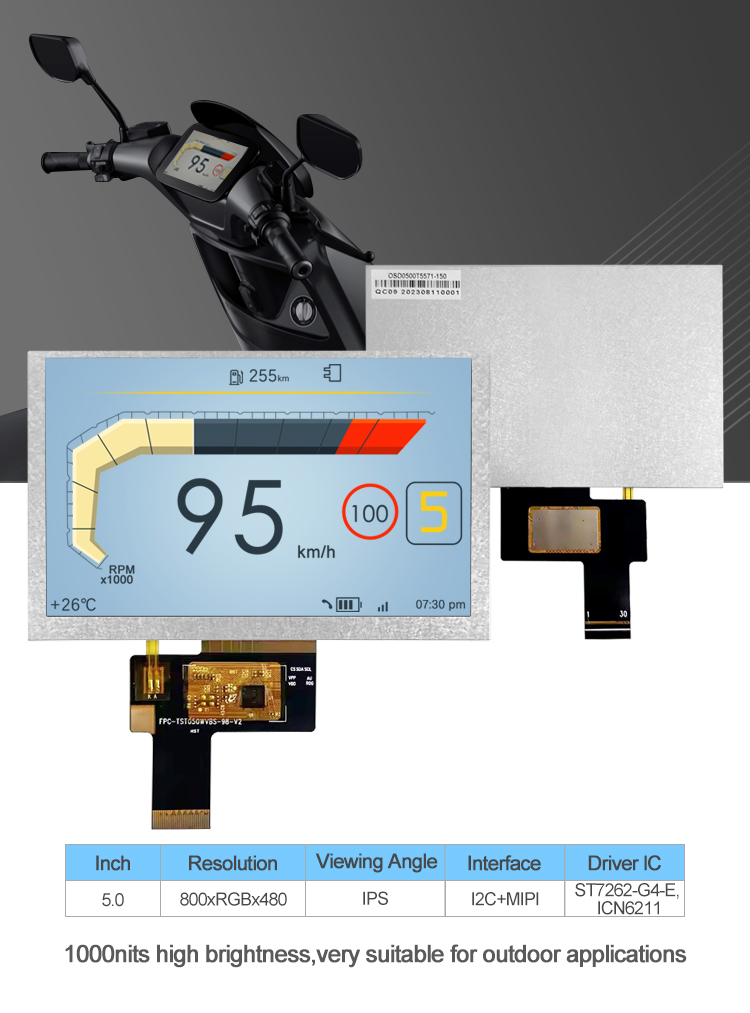
When selecting an LCD display module for your project, prioritize clarity, compatibility, and connectivity. The best choice depends on your application—whether it’s for industrial control panels, consumer electronics, or embedded systems. For example, if you're searching for a compact, low-power solution with clear text output, a character-based alphanumeric LCD display module with HD44780 controller may be ideal 1. Alternatively, graphic TFT LCD modules offer higher resolution and color support for data visualization or UI interfaces. Always verify voltage requirements (3.3V vs 5V), viewing angle, backlight type, and communication interface (SPI, I2C, parallel) before purchasing to ensure seamless integration.
About LCD Display Module
An LCD display module is an electronic visual output device that uses liquid crystal technology to present information such as text, graphics, or numerical data. These modules are widely used in devices like medical instruments, home appliances, automotive dashboards, vending machines, and industrial automation systems 2. Unlike standalone LCD panels, a 'module' typically includes not only the screen but also driver circuitry, backlighting, and often a built-in controller, making it easier to integrate into microcontroller-based designs.
LCD modules come in various sizes, ranging from under 1 inch to over 10 inches diagonally. They can be categorized primarily by content type: character displays (e.g., 16x2, 20x4 lines) and graphic displays (dot matrix or full-color TFTs). Most operate on low voltage, consume minimal power, and perform reliably across wide temperature ranges—making them suitable for both indoor and outdoor applications when properly sealed.
Why LCD Display Modules Are Gaining Popularity
The demand for LCD display modules continues to grow due to their cost-effectiveness, energy efficiency, and ease of integration into modern embedded systems. With the rise of IoT devices, smart sensors, and DIY electronics projects using platforms like Arduino and Raspberry Pi, developers need affordable, plug-and-play visual feedback components 3.
Additionally, advancements in manufacturing have made high-resolution color TFT-LCDs more accessible at lower price points. Their ability to deliver readable output under ambient lighting conditions—especially with LED backlights—makes them preferable over OLEDs in bright environments. Furthermore, many new modules now support standard communication protocols such as I2C and SPI, reducing wiring complexity and development time.
Types and Variants
Understanding the different types of LCD display modules helps narrow down options based on functionality and design constraints.
1. Character LCD Modules
These are designed to show fixed alphanumeric characters (letters and numbers) in rows and columns (e.g., 16×2 means 16 characters per line, 2 lines). Most use the industry-standard HD44780 controller, ensuring broad compatibility with development boards 4.
- Pros: Simple to program, low cost (~$2–$8), wide availability, works well for status messages or sensor readings.
- Cons: Limited to predefined fonts; cannot display custom graphics or symbols without workarounds.
2. Graphic LCD Modules (Monochrome)
These allow pixel-level control, enabling logos, icons, waveforms, or simple menus. Common resolutions include 128×64 and 128×128 pixels, typically using ST7920 or KS0108 controllers.
- Pros: Greater flexibility in UI design, supports basic drawings and animations.
- Cons: Requires more memory and processing power; programming is more complex than character LCDs.
3. TFT Color LCD Modules
Thin-Film Transistor (TFT) modules provide full-color displays with high resolution (e.g., 320×240 up to 800×480). Many include capacitive or resistive touchscreens and communicate via SPI or parallel interfaces.
- Pros: High clarity, vibrant colors, ideal for GUIs, data charts, or multimedia interfaces.
- Cons: Higher power consumption, more expensive ($10–$50+), requires robust microcontrollers (like ESP32 or ARM-based MCUs).
4. Segment LCD Modules
Used in devices like digital clocks, meters, and calculators, these have pre-defined segments (digits, icons) that light up individually. Driven by dedicated ICs, they are extremely power-efficient.
- Pros: Ultra-low power, excellent readability in sunlight, long lifespan.
- Cons: No flexibility—only displays what’s physically printed on the glass.
Key Features and Specifications to Evaluate
To choose the right LCD display module, consider the following technical aspects:
- Size and Resolution: Match physical dimensions to your enclosure. Resolution determines how much detail can be shown—important for graphs or small text.
- Viewing Angle: Look for wide-angle visibility (≥160° horizontal/vertical) to ensure readability from multiple positions 5.
- Backlight Type: LED backlights are standard; some offer adjustable brightness. Avoid modules with poor contrast in direct light.
- Voltage Compatibility: Confirm whether the module runs on 3.3V or 5V logic. Mismatched voltages can damage MCUs unless level shifters are used.
- Interface Options: Parallel (fast but pin-heavy), I2C (fewer wires, slower), SPI (balanced speed/wiring), or UART. Choose based on available MCU pins and speed needs.
- Operating Temperature: Industrial-grade modules support -20°C to +70°C or wider, critical for outdoor or harsh environments.
- Controller Chip: Known chips like ILI9341 (for TFTs) or HD44780 (character LCDs) have extensive community libraries and tutorials.
Pros and Cons of Using LCD Display Modules
Advantages:
- Low power consumption compared to OLEDs in non-dark mode.
- High reliability and longevity under normal operating conditions.
- Wide operating temperature range available in industrial versions.
- Cost-effective for mass production and prototyping alike.
- Good daylight readability with proper backlighting.
Disadvantages:
- Poor contrast in dark mode or low-light settings (black appears gray).
- Limited viewing angles in cheaper models.
- Slower response times than OLED, which may affect animation smoothness.
- Requires external backlight, increasing power draw when lit continuously.
LCD modules are ideal for applications requiring persistent, legible text or moderate graphics. However, for deep blacks, high contrast, or curved designs, OLED might be better despite higher cost and burn-in risks.
How to Choose an LCD Display Module
Follow this step-by-step guide to make an informed decision:
- Define Your Use Case: Are you showing sensor values (character LCD), drawing waveforms (graphic LCD), or building a touchscreen dashboard (TFT)?
- Check Physical Constraints: Measure space in your housing. Consider thickness, mounting style (through-hole vs surface mount), and connector orientation.
- Evaluate Microcontroller Compatibility: Ensure your MCU has enough GPIOs and supports required protocols. For example, SPI TFTs may require DMA support for fast updates.
- Assess Power Requirements: Battery-powered devices benefit from low-current monochrome or segment LCDs. Avoid always-on backlights unless necessary.
- Review Software Support: Check if libraries exist for your platform (Arduino, Python, etc.). Modules with common drivers reduce development time.
- Test Before Scaling: Order samples first. Test brightness, responsiveness, and code integration before bulk purchase.
- Avoid Red Flags: Beware of unlabeled clones with incorrect pinouts, missing datasheets, or exaggerated specs (e.g., claiming 170° viewing angle without evidence).
Price & Market Insights
Pricing varies significantly based on type, size, and features:
- Character LCDs: $2–$8
- Monochrome Graphic LCDs: $5–$15
- TFT Color Modules (without touch): $10–$30
- TFT with Touchscreen: $15–$50+
Budget modules often cut corners on build quality or documentation. Mid-range options from reputable suppliers (e.g., Adafruit, Newhaven Display, Waveshare) offer better reliability and support 6. For OEMs, bulk pricing drops sharply—expect 20–40% discounts at quantities over 100 units.
Value isn’t just about upfront cost. Factor in development time, debugging effort, and potential field failures. A slightly more expensive module with full documentation and demo code can save hours of troubleshooting.
| Type | Typical Size | Interface | Price Range | Best For |
|---|---|---|---|---|
| Character LCD | 2.2" (16x2) | Parallel/I2C | $2–$8 | Sensor readouts, menu navigation |
| Graphic LCD | 2.6" (128x64) | SPI/Parallel | $8–$15 | Waveforms, icons, basic UI |
| TFT Color | 2.4"–3.5" | SPI/Parallel | $15–$40 | Touch interfaces, dashboards |
Customer Feedback Synthesis
Analysis of user reviews across major electronics retailers reveals consistent patterns:
Common Praises:
- "Easy to connect with Arduino using existing libraries."
- "Clear display even in office lighting."
- "Backlight brightness is adjustable via resistor or PWM."
- "Perfect fit for my home automation panel."
Frequent Complaints:
- "Pin labels were reversed on the PCB—double-check before soldering." 7
- "No English datasheet included—had to find one online." 8
- "Colors looked washed out in sunlight despite claims of high visibility." 9
- "Touchscreen calibration was off out of the box." 10
These highlight the importance of sourcing from vendors who provide accurate documentation and tested hardware.
Sourcing & Supplier Tips
For individuals and small-scale developers:
- Purchase from established distributors like Digi-Key, Mouser, Adafruit, or SparkFun for reliable specs and returns.
- Use AliExpress or LCSC for budget options, but verify seller ratings and request datasheets before ordering.
For businesses and manufacturers:
- Contact original module makers (e.g., Noritake, Newhaven, Raystar) for customizations or volume orders.
- Negotiate MOQs (Minimum Order Quantities); some factories accept trial runs under 100 units.
- Request sample units with full test reports (electrical, environmental).
- Ensure RoHS and REACH compliance for EU shipments.
Maintenance, Safety & Legal Considerations
LCD modules generally require little maintenance. To extend lifespan:
- Avoid prolonged exposure to direct sunlight to prevent yellowing or delamination.
- Turn off backlight when not in use to reduce power draw and heat buildup.
- Store spares in anti-static bags in dry, cool places.
Safety-wise, most modules operate below 5V and pose no electrical hazard. However, ensure enclosures prevent accidental short circuits during installation.
Legally, commercial products must comply with regional electromagnetic compatibility (EMC) standards. Some LCDs emit minor EMI; shielding or filtering may be needed in sensitive applications. Always confirm regulatory markings (CE, FCC) if selling finished goods.
Conclusion
Selecting the right LCD display module involves balancing performance, compatibility, and cost. For basic text output, a standard character LCD with HD44780 controller offers simplicity and affordability. When richer visuals are needed, graphic or TFT modules provide enhanced capabilities but demand more resources. Key factors like interface type, voltage, size, and software support should guide your decision. By evaluating real-world needs, testing prototypes, and sourcing from trustworthy suppliers, you can integrate a reliable display solution that meets both functional and economic goals.
FAQs
- What is the difference between a character LCD and a graphic LCD?
- A character LCD displays predefined letters and numbers in a grid (like 16x2), while a graphic LCD allows pixel-by-pixel control, enabling custom images and symbols.
- Can I use an LCD display module with Arduino?
- Yes, most LCD modules are compatible with Arduino. Character LCDs work with built-in LiquidCrystal library; TFTs may require specific libraries like Adafruit_ILI9341.
- How do I choose the right interface for my LCD module?
- Choose I2C for minimal wiring, SPI for faster speeds, and parallel for legacy or high-throughput applications. Match the interface to your microcontroller's capabilities.
- Why does my LCD screen look blurry or dim?
- This could be due to incorrect contrast adjustment, insufficient backlight voltage, or viewing angle limitations. Check potentiometer settings and ambient lighting conditions.
- Are color TFT LCDs worth the extra cost?
- Only if your application benefits from color coding, icons, or graphical interfaces. For simple text, a monochrome display is more cost-effective and power-efficient.




 浙公网安备
33010002000092号
浙公网安备
33010002000092号 浙B2-20120091-4